Menu
Get Lemonade
Studio Mode

An infinite canvas for your
AI workflow.

An infinite pan-and-zoom canvas where terminals, sticky notes, images, and browsers live side by side. Arrange your AI workflow the way your brain works.

// Canvas Nodes

Every node type.
One canvas.

Terminal nodes

Full PTY terminals with any AI agent. Drag, resize, pin in place. Zero constraints on layout.

Group nodes

Multi-agent containers. Pack up to 8 terminals in one draggable grid. Add and remove agents on the fly.

Sticky notes

Annotate your workflow with color-coded notes. 7 colors. Resize freely. Perfect for context, TODOs, or architecture decisions.

Media nodes

Drag images, PDFs, and audio files straight onto the canvas. PNG, JPG, GIF, WebP, SVG. Aspect ratio locked on resize.

Browser nodes

Embed a live web browser right on the canvas. Full address bar, back/forward, refresh. Preview your work without leaving Studio.

Pan & zoom

0.25x to 3x zoom. Trackpad pinch, Ctrl+scroll, or keyboard shortcuts. Infinite canvas — no edges, no limits.

Coming soon

Task nodes

Interactive to-do lists pinned anywhere on the canvas. Check off tasks, track progress, and keep your agents on mission.

// How it works

Right-click.
Build your workspace.

Right-click anywhere on the canvas to spawn terminals, groups, notes, images, or browsers. Drag to position. Resize from any edge. Pin to lock. That's it.

  • 01

    Right-click the canvas

    Context menu with all node types. Pick an agent, set a group size, or drop a note.

  • 02

    Drag and resize freely

    Every node is draggable from its header. Resize from any edge or corner. Double-click to pin.

  • 03

    Pan, zoom, navigate

    Click empty space to pan. Ctrl+scroll to zoom. Ctrl+0 to reset. The canvas is infinite.
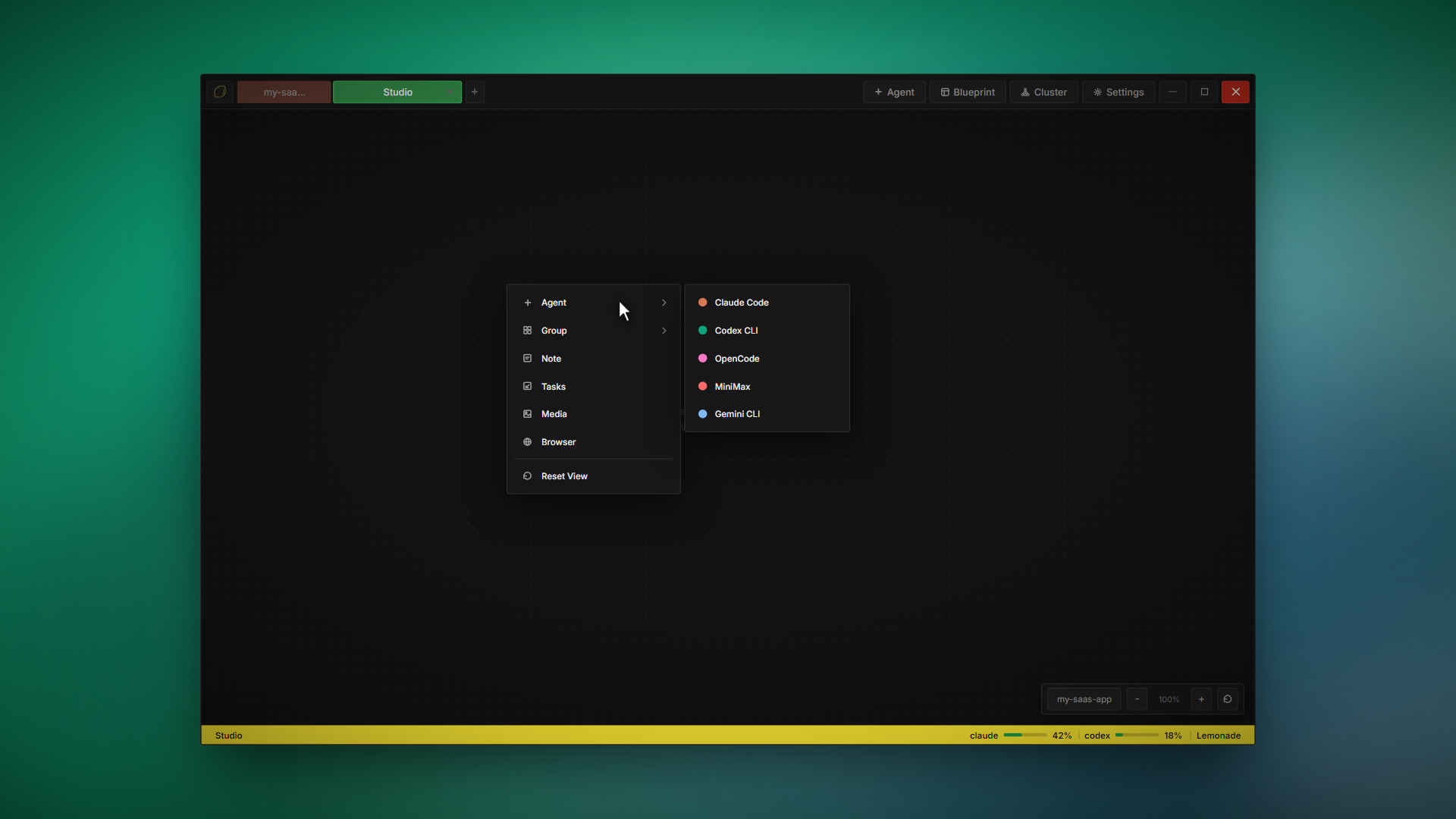
Studio right-click context menu

// A workflow for everyone

Pick the view that fits your flow.

Workspace

Structured grid. Up to 16 agents in fixed positions. Fast to launch, easy to manage.

Blueprint

Split-pane design mode. Terminal + live preview side by side for visual work.

Studio

Infinite canvas. Terminals, notes, images, browsers — anywhere you want them.

Cluster

Agent swarm. Multiple agents collaborating on the same task in parallel.

All four modes included in every license. Switch anytime.

Lemonade

Try Studio today.

Studio is included in every Lemonade license. $9 one-time, yours forever.